This one is for all the Photoshop people out there. It is a little bit different creative outlet then 3d, but it is still CG and still cool. You would be surprised how much you can use these same techniques for creating textures in 3d.
Showing posts with label Photoshop Tutorials. Show all posts
Showing posts with label Photoshop Tutorials. Show all posts


5.20.2007
Concept Art - Photoshop Tutorial

This shows a very interesting technique for making concept art in Photoshop. It is kind of hard to follow because english is apparently the second language of the artist, but cool nonetheless. You will definitely learn some new tricks.
3.28.2007

1.12.2007
Photoshop Matte Painting Tutorial: Back to the Firescape

This photoshop matte painting tutorial really gives a great overview of a project from beginning to end. The artist makes a point to give many "blow-up" shots so we can see every detail of what he is doing. He talks about the brushes he uses, and the brush stroke technique. What is impressive about this particular artist is the the looseness of his painting. You wouldn't know it from the picture but he paints in a very painterly style to begin with. Over time he tightens up his stroke for the details. The finish result is amazing as you can see. I thought it was a photograph. The colors are just perfect. Enjoy here...and make sure to check out other tutorials by clicking the tags below.
12.28.2006
Matte Painting Tutorial - Landscape in Photoshop

This painting is created from scratch using the various brushes in photoshop. It is very imformative for brush techniques and other matte painting related problems. Enjoy!
Click the tags below for more Photoshop / Matte Painting tutorials.
Amazing Illustration Tutorials - Photoshop

Kevin Hulsey is a professional illustrator that makes these amazing looking "engineering" drawings that you have probably seen before. Check out this tutorial to see the step by step process. He just uses Photoshop and his Wacom Tablet for this image. There is a lot to learn here.
Click the Photoshop Tutorials tag below to see all the great tuts!
12.20.2006
Matte Painting Tutorial
 Here is another matte painting tutorial that is very informational. This artist actually paints much of the image from scratch. You can learn a lot from these tutorials that are projects from beginning to end. This kind of image of course works best if you own a tablet, but like many other matte paintings, some of this image is photo compositing as well and not just freehand painting.
 12.19.2006
Good Tutorials - Great Photoshop Resource of Tutorials
Need help with your Photoshop skills? This is a great site to all those designs you wanted to know how to make. Amazing step by step tutorials submitted by other users. Massive Tutorial Library.read more digg story
HOW TO Create Excellent Vector Art
Step by step tutorial to create groovy vector art. I thought I'd share this crash course in creating amazingly hot vector artwork.read more digg story
12.13.2006
David Revoy Tutorials

David Revoy, a professional concept artist, offers up his many insights for your benefit. He does incredible work, and really uses some unique techniques to get the job done. You will learn a ton from the various tutorials he goes through. Many of them are in French, but the pictures are the most important part. There are some in English too, plus some that are all pictures. Programs included are Photoshop, blender, and painter. His tutorial page is here.
12.10.2006
Painting Tutorial Using Photoshop

This essential tutorial perfectly illustrates something that every artist (3d or 2d) must grasp to be successful...color. Along the way of making this beautiful image, the artist explains all the techniques necessary to properly manipulate color using photoshop. The artist also shows how to use custom brushes to create these amazing techniques. You have to see this tutorial, we promise you will learn much from this talented individual. Tutorial Here.
12.05.2006
Amazing PS Tutorial : Especially If You Have a Tablet
Original tutorial @ CGArena

Break out your tablets, and if you don't have one look here. This is a great Photoshop tutorial done on a highly professional level. Even if you don't have a tablet you can learn some amazing techniques. Follow this tutorial from begining to end and see how to create a beautiful photoshop painting. You'll love this one...I promise!
12.02.2006
Featured Work


Flickr member SamHastings has posted some really nice artwork in our new flickr group, like the one seen here. He has been generous enough to offer a brief explanation of his technique.
"take the source image and trace vector it using the pen tool. (i normally posterise a duplicate of the original image and then go over the lines, using the original for colouring)
next, duplicate the original image to a new canvas.
then convert to grayscale.now use either image>adjustments>threshold or contrast function. (for this image i used contrast but play around and see what you prefer)apply a little filter>blur>gaussian blur then convert to bitmap:-
(flatten layers?=yes - output?=whatever original image was pixels/inch - method use?=halftone screen ok frequency?=you choose - angle?=45 degrees - shape?=round)
now convert back to grayscale (size ratio?=1) then convert to RGB, now duplicate the image back into your original document. (with the vector)
change the blending mode on this new, half toned layer to soft light or multiply (experimentation!) and adjust the opacity until you're happy with it.
i used the same sort of technique for the flowers in the background, except i added some inner shadows and other such things to create some shadowing before i bitmapped them, otherwise you end up with a uniform pattern of dots which looks crap.
that's about it i think, if any more comes to mind then I'll rectify that at a later date.
good luck! and as i say, experimentation is the key, if you just follow these instructions to the letter then where's the individuality?! have fun with it, let me know how it goes and let me see your interpretations."
"take the source image and trace vector it using the pen tool. (i normally posterise a duplicate of the original image and then go over the lines, using the original for colouring)
next, duplicate the original image to a new canvas.
then convert to grayscale.now use either image>adjustments>threshold or contrast function. (for this image i used contrast but play around and see what you prefer)apply a little filter>blur>gaussian blur then convert to bitmap:-
(flatten layers?=yes - output?=whatever original image was pixels/inch - method use?=halftone screen ok frequency?=you choose
now convert back to grayscale (size ratio?=1) then convert to RGB, now duplicate the image back into your original document. (with the vector)
change the blending mode on this new, half toned layer to soft light or multiply (experimentation!) and adjust the opacity until you're happy with it.
i used the same sort of technique for the flowers in the background, except i added some inner shadows and other such things to create some shadowing before i bitmapped them, otherwise you end up with a uniform pattern of dots which looks crap.
that's about it i think, if any more comes to mind then I'll rectify that at a later date.
good luck! and as i say, experimentation is the key, if you just follow these instructions to the letter then where's the individuality?! have fun with it, let me know how it goes and let me see your interpretations."
Comments are now available on this site, so make sure to leave one!
11.20.2006
A Nice Painting Tutorial
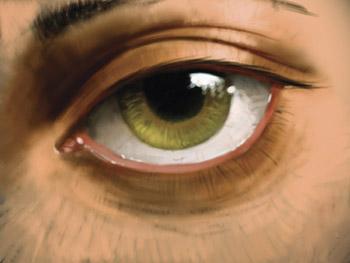 Here is a simple tutorial on how to paint an eye using photoshop and a Wacom Tablet. These tablets are of course awesome! It is really fun to paint with. Anyway...this tutorial shows you how to create the proper brush for painting naturally. As you can see, the results are impressive.
http://www.tutorialsbox.com/tutorial1.html
11.18.2006
Incredible Matte Painting Tutorial
This picture is copied from 3dtotal.com
You have to see this. No matter what kind of art you're into, the skills learned in this tutorial are valuable. Plus, once again it offers a great opportunity to see a professional project from beginning to end. The final result is awesome.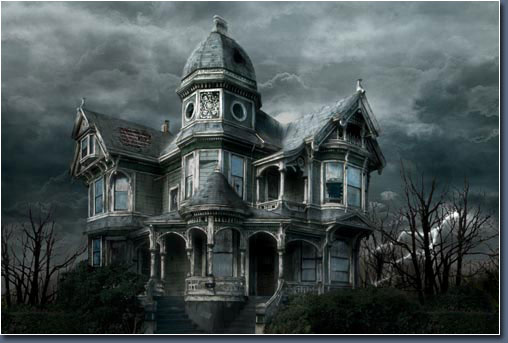
http://www.3dtotal.com/ Follow this link, then go to free stuff>tutorials>photoshop. Tons of great stuff here as always.
11.17.2006
Photoshop - "Sketchy Look" Tutorial
Some times in visualization we are going for photorealism, but sometimes clients want a "hand drawn" look. This tutorial shows how to turn an image from one into the other. Plus, traditional artists are always looking for a way to use the computer to create images like the ones they used to draw by hand. This tutorial can help. It's quick and easy...check it out!
http://www.lunacore.com/photoshop/tutorials/tut007.htm
...and check out all the other tutorials on the page as well.
http://www.lunacore.com/photoshop/tutorials/tut007.htm
...and check out all the other tutorials on the page as well.
11.16.2006
Evermotion.org

My favorite feature of this website is the free tutorials. There are some really good ones in all different types of catergories. There is something for every 3d program, plus compositing and Photoshop. Check them all out. There are even video tutorials. Of course, there are always the galleries and the forums to check out.
11.15.2006
An Incredible New Tutorial!

I have said it before and I will say it again, 3d total has the best tutorials on the web! This new addition by Stefan Morrell is no exception. Like many of the others, this tutorial follows a fantastic project from beginning to end. The end result is stunning. Probably one of the nicest things about this tutorial is the in depth explanation of the texturing process (which you can see is executed masterfully), and also the final compositing in photoshop. This is a very important skill, and nowhere have I ever seen it explained so well in a tutorial as it is here. Some great tips and tricks to make your images stand out.
http://67.15.36.49/team/Tutorials_2/making%20of_urban-environment/urban_01.asp
11.13.2006
Important Photoshop Trick Explained - Accurate Shadows in Photoshop

All 3d artists need a good understanding of Photoshop (or a similar program). For those of us that like to composite images it is often necessary to use Photoshop for adding content to our images, such as trees, people, or cars. One problem that arises with this technique is getting accurate shadows. Learn how to accurately create shadows here. Very simple, but helpful for beginners.
An Amazing Resource - Lots of Free Stuff

3d total is one of the best 3d resources on the web. It has tons of tutorials, textures, and other resources for free. There are also many great textures for sale. We have all seen the great products created with these textures, including our previous post.
The tutorial page has so many great learning opportunities. The tutorials are broken down into all the different programs and all the different catergories you need, including:
- Beginners
- Complete Projects
- Modelling and Rigging
- Animation and Rigging
- Lighting, Rendering, and Effects
- Texturing
There is also some 2d stuff including Photoshop and Digital Painting. You just can't beat this site. Check out all the free textures too.
Subscribe to:
Posts (Atom)